Hyppo's chat answers questions about your own training. It reads your plan, your runs, your check-ins and your fuel. When you ask for a change, it answers with a card, and nothing changes until you press Apply.
Open the chat
Ask Hyppo in the header, on every page. On a narrow window the header shows Hyppo's avatar alone. A second press closes the chat.
Ask about today… under Hyppo's note on Today. Type a question and press Enter, and it goes out as the first question of a new chat. An empty field opens the chat.
Ask Hyppo on a run's page and on a workout's page.
The command menu, ⌘K or Ctrl+K. Type a question and pick Ask Hyppo: with your question.
In a window 1280px wide or more, the chat opens as a panel beside the page, and the page stays usable. Below that width it slides over the page. An answer keeps coming while the chat is closed.
A question goes out with the page you have open, so "Why was this so slow?" on a run's page is about that run. A chip such as About today at the top of the chat names the page, and its × sends the question without it. A conversation keeps the page of its first question. Switch to this page moves it to the page you have open.
Give the AI consent
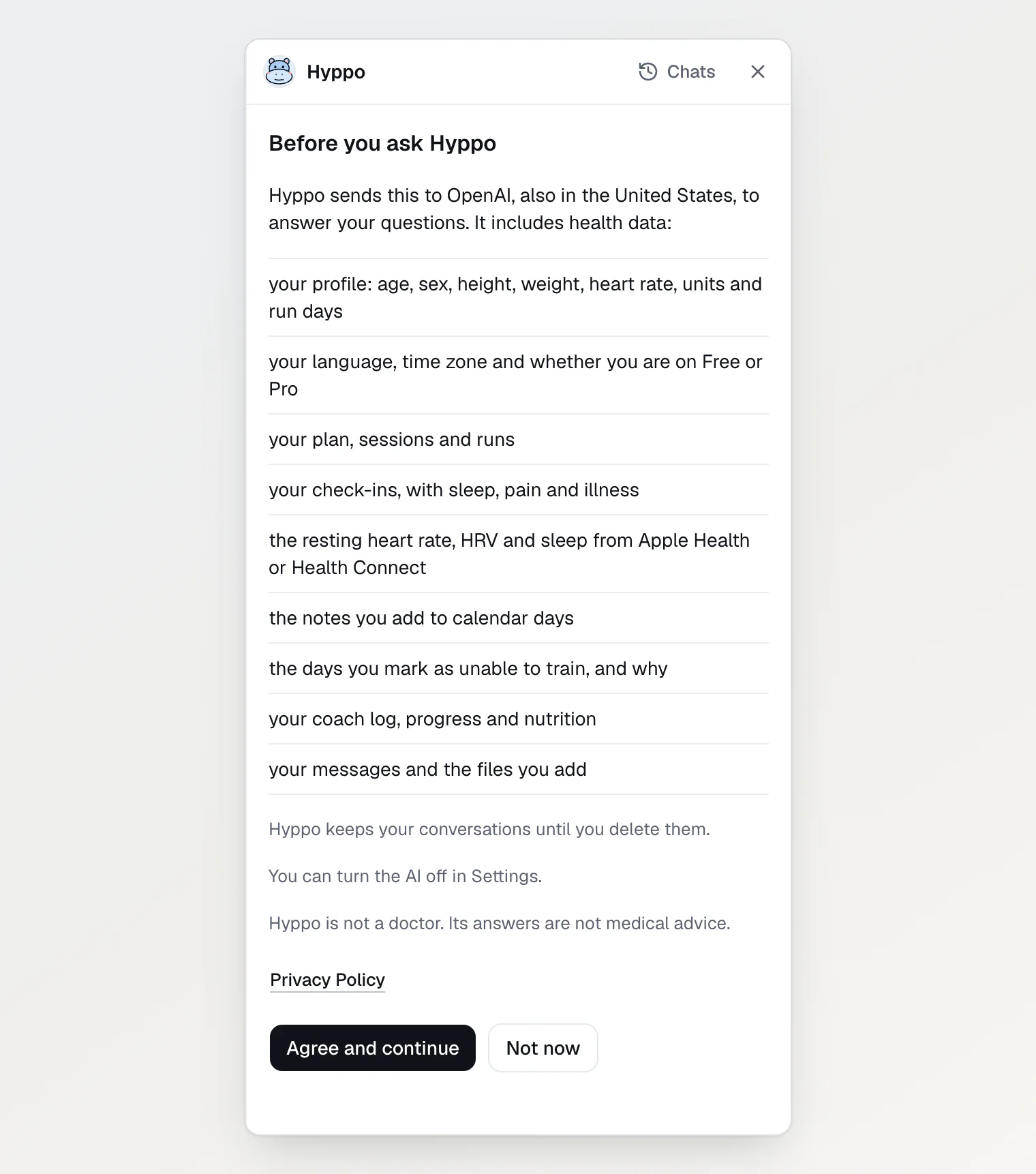
Unless you turned on Hyppo’s chat and meal estimates when you set up, the chat shows Before you ask Hyppo in place of the conversation. It lists what Hyppo sends to OpenAI, also in the United States, to answer you. The list includes health data:
your profile: age, sex, height, weight, heart rate, units and run days
your language, time zone and whether you are on Free or Pro
your plan, sessions and runs
your check-ins, with sleep, pain and illness
the resting heart rate, HRV and sleep from Apple Health or Health Connect
the notes you add to calendar days
the days you mark as unable to train, and why
your coach log, progress and nutrition
your messages and the files you add
Hyppo doesn't send your health answers or the routes of your runs, and it doesn't add your name or email. OpenAI keeps what it gets for up to 30 days in its abuse-monitoring logs, or longer where the law requires it. The Privacy Policy has the details.
Press Agree and continue. If you typed a question before the screen opened, it goes out now.
Not now closes the chat and sends nothing.
The same screen says that Hyppo keeps your conversations until you delete them, and that Hyppo is not a doctor: its answers are not medical advice. One consent covers the chat and the meal estimates. To withdraw it, open Training settings from your avatar menu and turn off Hyppo’s chat and meal estimates under Your data. The chat and the estimates stop.
Ask a question
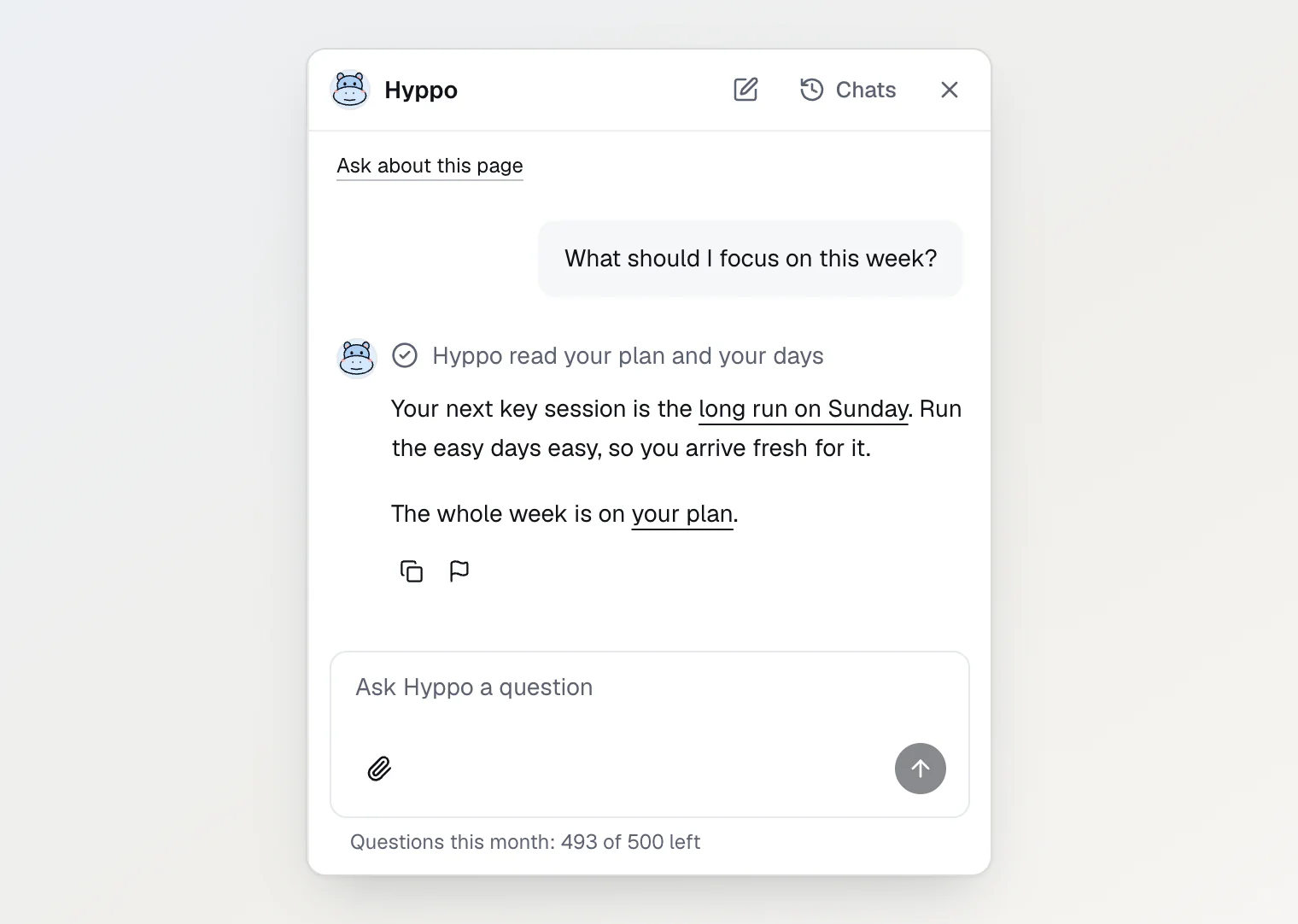
Type your question in Ask Hyppo a question.
Press Enter. Shift+Enter starts a new line.
While Hyppo answers, a line shows what it reads, such as Reading your plan. The square button in the field stops the answer.
An empty chat suggests two questions for the page you're on, such as Why is today’s session like this? on Today. Links in Hyppo's answers open your own runs, sessions and pages. If an answer is wrong or harmful, press the flag under it (Report) to send it to Hyppo Run for review.
Report pain and illness in the morning check-in, whose rules adjust your plan for them: Check in and see what Hyppo changes. If you have chest pain, a racing heartbeat or trouble breathing right now, call emergency services instead of asking the chat.
Apply a change Hyppo proposes
Ask Hyppo to move, skip or shorten a session, log a run, a meal or your weight, plan your own workout, or change your run days or your plan, and it answers with a card that lists the change line by line.
Only the cards of Hyppo's newest answer, made today, apply. A card from an earlier answer reads Not applied. A card from an earlier day, or one that no longer matches your plan, changes nothing on Apply and reads This is out of date. Nothing changed. Ask Hyppo again for a new card.
Read the card's lines, and its warnings if it has any.
Press Apply.
The app checks the change again with the same rules as its own screens, then makes it. The card reads ✓ Applied, with a link to what changed.
A card with a warning lists it after ⚠, and its button reads Apply anyway.
A change you can't undo, such as deleting a run or replacing your plan, has a button that names it: Delete run, Replace my plan.
Add photos or a PDF
One question takes up to 4 files: photos, and at most one PDF of up to 10 MB and 30 pages, without a password.
Press the paperclip in the field (Add a file), or paste or drop the files on the field.
Type your question. Without one, the app sends "What does this file show?".
Press Enter.
The field takes JPEG, PNG, WebP, GIF, HEIC, HEIF, AVIF and BMP photos. If your browser can't open one, the field shows "This photo cannot be read. Try a JPEG or PNG." The app scales each photo and saves it again before the upload, so its location and camera data stay on your device.
A question with a photo gets one kind of card, Log a meal. Its estimate counts against your monthly meal and photo estimates as soon as the card shows, whether or not you press Apply. With only a PDF, the question gets no card.
Questions per month
Free has 20 questions a month, and Pro has 500.
A line under the field counts what's left, such as "Questions this month: 13 of 20 left · Pro: 500". Upgrade and billing in Settings shows the same count under Hyppo usage.
The count starts again on the 1st of the month, at midnight in your time zone.
Every question counts, Try again too. A question that fails before Hyppo starts to answer doesn't count.
Deleting a conversation doesn't give its questions back.
At the limit, the chat says No questions left this month and the date they come back. On Free it offers Upgrade. Your conversations stay under Chats.
One conversation holds up to 100 questions. After that, the chat asks you to start a new one.
Find or delete a conversation
Hyppo keeps your conversations until you delete them. The pen button in the chat's bar (New chat) starts a new one, and Chats lists the old ones. Press one to open it and ask on. A deleted conversation can't be brought back, and its questions still count this month.
Press Chats in the chat's bar.
Press the bin next to the conversation.
Press Delete in Delete this chat?.
Hyppo deletes the conversation at once. Its files leave storage within about 30 days. To delete every conversation at once, press Delete all conversations under the list and confirm with Delete all.
With the AI turned off, Ask Hyppo opens the consent screen, and Chats in its bar still lists your conversations and deletes them. To read one again, turn the AI back on.
Continue reading
Check in and see what Hyppo changes — what the morning check-in changes in your plan, and where the coach log shows it.
Turn health data and the AI on or off — what each consent covers and what turning it off deletes.
Delete your account or part of your data — what goes when you delete your account, your conversations with Hyppo included.